
LED Display Pixel Pitch vs Viewing Distance: How to Choose the Right Pixel Pitch
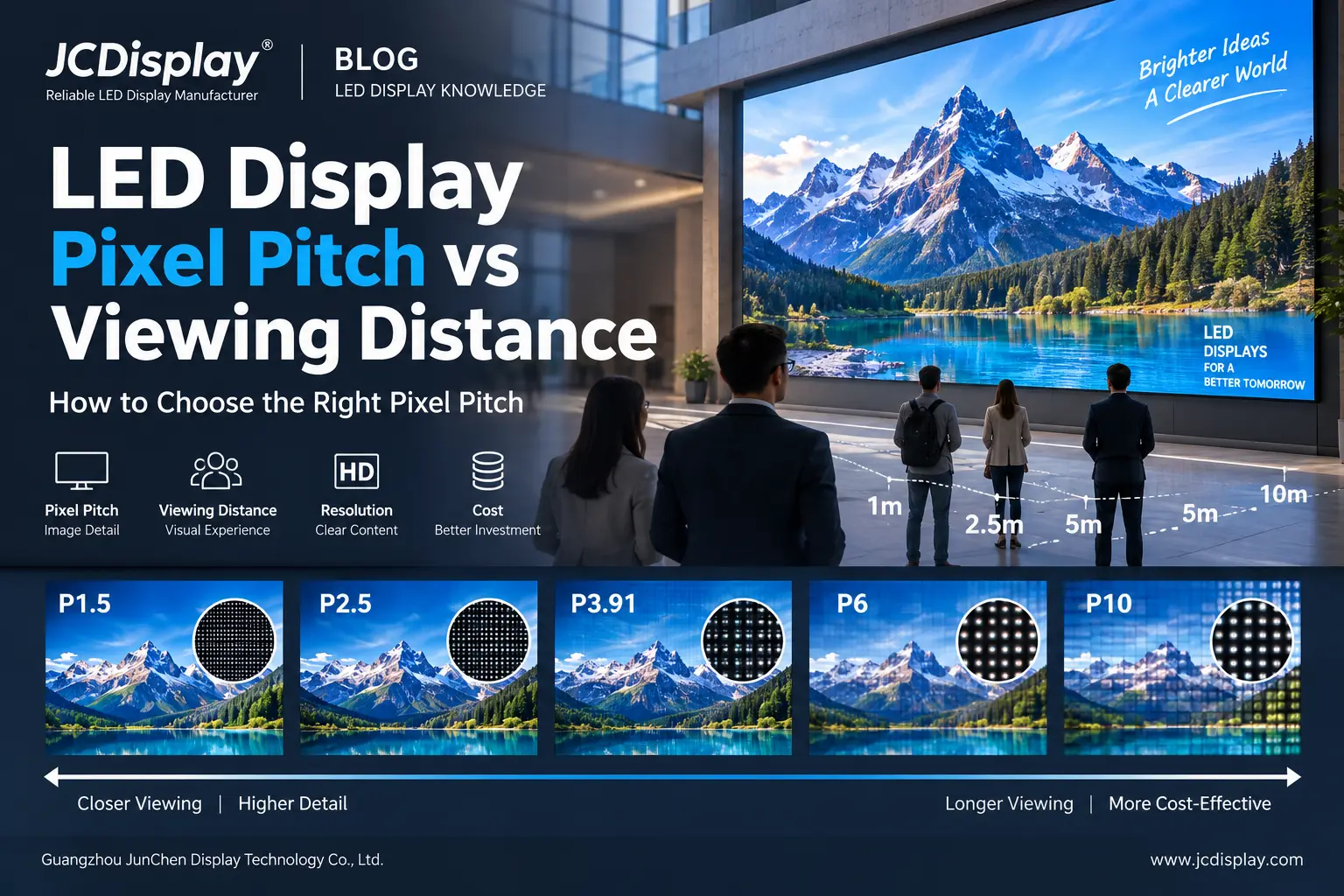
Pixel pitch and viewing distance are two of the most important factors when selecting an LED display.
Choose a pixel pitch that is too large, and close viewers may notice reduced image detail. Choose a pixel pitch that is unnecessarily small, and the project may cost more without creating a meaningful visual improvement at the actual viewing distance.
For B2B buyers, the objective is not to choose the smallest pixel pitch available.
It is to choose the pixel pitch that provides sufficient image quality for the actual audience distance, screen size, content and application.
If you are still comparing LED display type, brightness, installation environment and maintenance method, read our complete guide: How to Choose the Right LED Display for Your Business.
Table of Contents
- What Is LED Display Pixel Pitch?
- Why Viewing Distance Matters
- Pixel Pitch vs Viewing Distance Chart
- Smaller Pixel Pitch Does Not Always Mean Better
- How Pixel Pitch Affects LED Display Resolution
- Screen Size and Content Can Change the Right Pixel Pitch
- Indoor vs Outdoor Pixel Pitch
- P1.5 vs P2.5 vs P3.91 vs P6 vs P10
- Pixel Pitch and Project Cost
- How to Choose Pixel Pitch by Application
- Five Common Pixel Pitch Selection Mistakes
- LED Pixel Pitch Selection Checklist
- JunChen Display Recommendation
- FAQ
- Conclusion
Quick Answer: Pixel Pitch vs Viewing Distance
Pixel pitch is the center-to-center distance between adjacent LED pixels, measured in millimeters.
The basic relationship is:
Smaller Pixel Pitch → Higher Pixel Density → Better for Closer Viewing
Larger Pixel Pitch → Lower Pixel Density → Better for Longer Viewing Distances
A commonly used starting reference is:
Minimum Viewing Distance (meters) ≈ Pixel Pitch (mm)
For example, P2.5 may be considered from approximately 2.5 meters as an initial planning reference.
However, this is not a fixed engineering rule. Screen size, content type, required resolution, audience expectations and budget should also be considered.
LED Pixel Pitch vs Viewing Distance Quick Table
| Pixel Pitch | Approx. Starting Viewing Distance* | Typical Applications |
|---|---|---|
| P0.9–P1.2 | Around 1 m | Control rooms, premium boardrooms |
| P1.5 | Around 1.5 m | Meeting rooms, showrooms |
| P1.8–P2 | Around 2 m | Corporate spaces, retail |
| P2.5 | Around 2.5 m | Retail, halls, commercial spaces |
| P3–P3.91 | Around 3–4 m | Events, exhibitions, rental stages |
| P4–P6 | Around 4–6 m | Shopping malls, commercial advertising |
| P8 | Around 8 m | Large outdoor displays |
| P10 | Around 10 m | Roadside billboards, building facades |
*Approximate starting reference only. Final selection should be based on the actual project.
1. What Is LED Display Pixel Pitch?
Pixel pitch describes the distance between the centers of two neighboring LED pixels.
For example:
- P1.5 ≈ 1.5 mm
- P2.5 ≈ 2.5 mm
- P3.91 ≈ 3.91 mm
- P6 ≈ 6 mm
- P10 ≈ 10 mm
The smaller the pitch, the more pixels can fit within the same physical screen area.
That generally means higher pixel density, higher resolution at the same screen size, better image detail at close range and usually higher hardware cost.
A larger pixel pitch provides fewer pixels within the same area, but this can be completely suitable when viewers are farther away.
2. Why Viewing Distance Matters
Viewers do not experience an LED display from a specification sheet. They experience it from where they stand.
At close range, the spaces between pixels are easier to notice.
As viewing distance increases, individual pixels visually blend together and the image appears smoother.
This is why a P10 display may work well for a large roadside billboard but would normally be unsuitable for a meeting room where viewers sit close to the screen.
At the same time, using P1.5 for a billboard viewed from dozens of meters away can add considerable pixel density and cost without delivering useful additional detail.
JunChen Display Insight
When selecting pixel pitch, the closest realistic viewing position can be more useful than the average viewing distance.
For example, if most viewers are 10 meters away but customers can sometimes stand 2 meters from the display, the closer viewing position should be considered during selection.
3. Pixel Pitch vs Viewing Distance Chart
| Pixel Pitch | Viewing Situation | Typical Applications | Main Priority |
|---|---|---|---|
| P0.9–P1.2 | Extremely close | Control rooms, premium boardrooms | Maximum detail |
| P1.5–P1.8 | Very close | Meeting rooms, corporate spaces | Fine image detail |
| P2–P2.5 | Close | Retail, showrooms | Detail + cost balance |
| P3–P3.91 | Medium | Events, exhibitions | Versatility |
| P4–P6 | Medium to long | Malls, advertising, commercial buildings | Cost efficiency |
| P8–P10 | Long | Outdoor advertising, large facades | Visibility |
This table should be used as a project-planning reference rather than a rigid engineering standard.
Two projects with the same viewing distance can still require different pixel pitches because their screen size, content and target resolution may be different.
4. Smaller Pixel Pitch Does Not Always Mean Better
One of the most common LED purchasing assumptions is:
Smaller pixel pitch = better LED display.
A smaller pitch does provide higher pixel density.
Commercially, however, it is not always the better decision.
Imagine two LED displays with exactly the same physical dimensions:
Option A: P1.5
Option B: P2.5
The P1.5 display contains considerably more pixels.
If viewers are close and the screen displays small text, detailed graphics or technical information, the additional pixel density can provide real value.
But if viewers are much farther away, the practical visual difference may become much smaller.
B2B Buyer Rule
Do not pay for resolution your audience cannot practically see.
The right pixel pitch should deliver enough detail for the application without unnecessary investment.
5. How Pixel Pitch Affects LED Display Resolution
Pixel pitch and resolution are closely related, but they are not the same specification.
Pixel pitch describes how closely pixels are spaced.
Resolution describes how many pixels the complete screen contains.
When screen dimensions are converted to millimeters:
Horizontal Resolution ≈ Screen Width ÷ Pixel Pitch
Vertical Resolution ≈ Screen Height ÷ Pixel Pitch
For example, a screen that is:
5 meters wide = 5,000 mm
Using P2.5:
5,000 ÷ 2.5 = 2,000 horizontal pixels
Using P5:
5,000 ÷ 5 = 1,000 horizontal pixels
Therefore:
Same Screen Size + Smaller Pixel Pitch = Higher Resolution
This is why pixel pitch should always be evaluated together with the physical screen dimensions.
6. Screen Size and Content Can Change the Right Pixel Pitch
Viewing distance alone should not determine the final LED configuration.
Consider two screens with similar audience distances.
Project A
A corporate LED wall displaying spreadsheets, dashboards, small text and detailed charts.
Project B
An exhibition display showing large logos, promotional videos, branding and visual effects.
Project A generally requires more pixel density because viewers need to read smaller details.
Project B may achieve excellent visual results with a larger pitch.
A better selection relationship is therefore:
Viewing Distance + Screen Size + Content + Target Resolution = Suitable Pixel Pitch
7. Indoor vs Outdoor Pixel Pitch
Indoor LED displays are generally viewed from shorter distances.
Common indoor pitch options may include:
P0.9 / P1.2 / P1.5 / P1.8 / P2 / P2.5 / P3
Typical applications include meeting rooms, control rooms, retail stores, showrooms, shopping malls and corporate spaces.
Outdoor LED displays often serve audiences at longer viewing distances.
Common pitches may include:
P3 / P4 / P5 / P6 / P8 / P10 and above
Typical applications include outdoor advertising, commercial buildings, stadiums, shopping centers, roadside billboards and building facades.
However, indoor or outdoor use alone does not determine pixel pitch.
A close-viewing outdoor display may require a finer pitch than a large indoor display viewed from farther away.
8. P1.5 vs P2.5 vs P3.91 vs P6 vs P10
| Pixel Pitch | Best Suited To | Typical Applications | Main Advantage |
|---|---|---|---|
| P1.5 | Very close viewing | Meeting rooms, control rooms | Fine detail |
| P2.5 | Close commercial viewing | Retail, showrooms | Detail + value |
| P3.91 | Medium viewing distance | Rental stages, events | Versatility |
| P6 | Medium to long viewing | Commercial advertising | Cost efficiency |
| P10 | Long-distance viewing | Billboards, building facades | Large-scale visibility |
P1.5
P1.5 is suitable for applications where viewers are close and fine image detail is important, such as meeting rooms, control rooms and premium commercial spaces.
P2.5
P2.5 provides a practical balance between image quality and cost for many indoor commercial applications, including retail stores, showrooms and commercial halls.
P3.91
P3.91 is widely used for rental and event LED displays. It provides a practical balance between image quality, viewing distance and system cost for stages, exhibitions and events.
P6
P6 is oriented toward medium-to-long viewing applications where close-up detail is less important, including commercial advertising and outdoor installations.
P10
P10 is suitable for very large LED screens viewed from farther away, particularly roadside billboards and large building displays.
9. Pixel Pitch and Project Cost
Pixel pitch can significantly affect LED display cost.
As the pitch becomes smaller, more pixels must fit into the same physical area.
This can increase requirements for LED components, driver electronics, receiving capacity, processing and manufacturing precision.
For this reason, finer-pitch displays generally cost more per square meter.
Example
Suppose an outdoor commercial display is mainly viewed from 25–30 meters away.
The buyer receives two options:
Option A: P4
Option B: P6
P4 provides higher pixel density.
But the important question is:
Will viewers at 25–30 meters benefit enough from the additional pixel density to justify the higher project cost?
If not, P6 may provide better commercial value.
The lowest pitch is not automatically the highest-value solution.
10. How to Choose Pixel Pitch by Application
| Application | Main Requirement | Pixel Pitch Direction |
|---|---|---|
| Control room | Fine text and data | Very fine |
| Meeting room | Close viewing | Fine |
| Retail store | Detail + visual impact | Fine to medium |
| Shopping mall | Commercial visibility | Medium |
| Exhibition | Flexible audience distance | Medium |
| Rental event | Viewing distance + portability | Medium |
| Commercial building | Visibility + cost balance | Medium to larger |
| Roadside billboard | Long-distance visibility | Larger |
| Stadium | Large audience distance | Larger |
The application should come before the product model.
If you also need to compare brightness, cabinet type, installation and maintenance requirements, see our full LED Display Buying Guide.
11. Five Common Pixel Pitch Selection Mistakes
1. Choosing the Smallest Pitch Available
More pixels only create value when the application benefits from them.
2. Ignoring the Closest Viewer
The closest realistic viewing position can be more important than the average audience distance.
3. Looking at Pixel Pitch Without Screen Size
Pixel pitch alone does not determine total screen resolution.
4. Ignoring the Content
Fine text and technical data require more detail than large advertising graphics or stage visuals.
5. Comparing Suppliers Only by Pixel Pitch
Also compare brightness, refresh rate, LED components, cabinet design, control system, maintenance method, warranty, spare parts and total project cost.
12. LED Pixel Pitch Selection Checklist
| Project Requirement | Information to Provide |
|---|---|
| Application | Meeting room, retail, event, advertising, etc. |
| Environment | Indoor or outdoor |
| Screen size | Width × height |
| Closest viewing distance | Minimum realistic distance |
| Typical viewing distance | Main audience position |
| Content | Video, text, data, graphics, advertising |
| Resolution requirement | HD / FHD / 4K target if required |
| Installation | Wall, structure, hanging, stage, etc. |
| Operating hours | Expected daily usage |
| Budget | Target project range |
The more complete the project information, the more accurately an LED display manufacturer can recommend a suitable pixel pitch.
13. JunChen Display Recommendation
For B2B projects, JunChen Display recommends treating viewing distance as the starting point—not the final answer.
A practical selection process is:
Application → Closest Viewing Distance → Screen Size → Content → Required Resolution → Pixel Pitch → Budget
This helps prevent two common problems.
Pixel Pitch Too Large
Close viewers may see insufficient image detail.
Pixel Pitch Unnecessarily Small
Project cost increases without creating enough practical visual improvement.
The goal is to select the most appropriate pixel density for the actual project, rather than simply choosing the smallest available pitch.
14.FAQ
What is LED display pixel pitch?
Pixel pitch is the center-to-center distance between adjacent LED pixels, measured in millimeters. A smaller pixel pitch means the pixels are positioned closer together.
How do I estimate LED display viewing distance?
As a quick planning reference, the minimum viewing distance in meters is often close to the pixel-pitch number in millimeters. However, this is not a fixed rule and should be adjusted according to screen size, content and required image quality.
Is P2.5 better than P3.91?
Not necessarily. P2.5 provides higher pixel density and is better suited to closer viewing. P3.91 can be more cost-effective for events, rental systems and medium viewing distances.
What pixel pitch is suitable for a meeting room?
Fine pitches such as P1.2, P1.5, P1.8 or P2 may be considered depending on the closest viewing distance, screen dimensions, content and required resolution.
What pixel pitch is suitable for outdoor advertising?
Outdoor advertising commonly uses pitches such as P4, P5, P6, P8 or P10. The correct choice depends on viewing distance, screen size, installation location and content.
Is smaller pixel pitch always more expensive?
Generally, smaller pitch requires more pixels within the same screen area and therefore tends to increase display cost. Other components and technical specifications also affect final pricing.
Does pixel pitch determine LED screen resolution?
Not by itself. Final resolution depends on both pixel pitch and physical screen dimensions.
15.Conclusion
The relationship between LED display pixel pitch and viewing distance is fundamental to choosing the right LED screen.
The basic principle is simple:
Closer Viewer → Smaller Pixel Pitch
Farther Viewer → Larger Pixel Pitch
However, professional LED display selection should consider more than viewing distance alone.
The right configuration combines:
Viewing Distance + Screen Size + Content + Resolution + Environment + Budget
A smaller pixel pitch provides higher pixel density, but higher pixel density only creates value when the audience can actually benefit from it.
Instead of asking:
“What is the smallest pixel pitch you can provide?”
ask:
“What pixel pitch gives my project the required image quality at the actual viewing distance without unnecessary cost?”
That question leads to a more practical and cost-effective LED display investment.
Need Help Choosing the Right Pixel Pitch?
Send JunChen Display your:
Screen Size + Closest Viewing Distance + Application + Indoor/Outdoor Environment + Destination
Our team can recommend a suitable pixel pitch and LED display configuration for your project.
JunChen Display
Guangzhou JunChen Display Technology Co., Ltd.
WhatsApp: +86 188 1890 1997
Email: admin@ledscreenwholesale.com
LED Display Solutions for Plastic Surgery Clinics & Beauty Salons: Installation Design Guide
How to Choose the Right LED Display for Your Business

Tell Us What Are You Looking For?
